Automated Document Processing: Turning Chaos into Actionable Data
Enterprise documents hide valuable data in PDFs, scans, and emails. Learn how AI-powered document processing pipelines transform unstructured chaos into clean, actionable insights.
Introduction
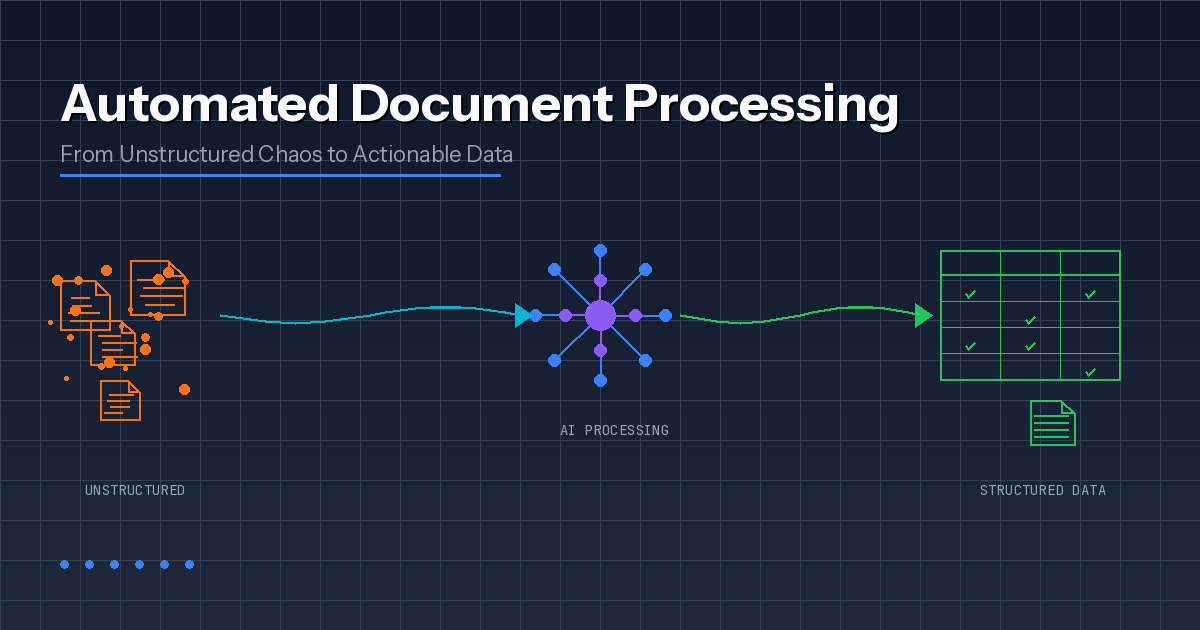
Every enterprise runs on documents. Invoices arrive as PDFs. Insurance claims land as scanned packets. Contracts bury critical terms in walls of text. Somewhere, someone is manually retyping data so systems can move forward — and the whole operation slows down when volumes spike or formats change.
Automated document processing changes this equation entirely. Instead of treating documents as obstacles, modern AI pipelines transform unstructured content into structured data that downstream systems can actually use. The result? Faster turnaround, fewer errors, and dramatically less rework when the same issues repeat across thousands of documents.
This guide breaks down how automated document processing actually works, where it differs from basic OCR, and which technology choices matter when you're building for production rather than demos.
The Problem with Manual Document Processing
Manual review works fine when document volumes stay low and processes remain stable. The moment volume spikes, templates change, or compliance asks for evidence, manual processing starts behaving like a leaking pipe: the fix always seems small, yet the floor stays wet.
Human Error Compounds Quickly
People excel at judgment and context. But data entry across hundreds of business documents creates predictable failure modes that have nothing to do with competence. Fatigue, shifting templates, and tools that treat humans as universal parsers guarantee problems.
Common patterns emerge across every industry: transposed numbers in invoice totals or policy IDs, conflicting document versions floating across email threads, creative abbreviations that break downstream validation, and missing fields that look harmless until month-end close reveals a cascade of errors.
Slow Turnaround Creates Visible Pain
Speed is where document processing pain becomes visible to leadership. Delays manifest as late payments, slow customer onboarding, and growing backlogs that compound daily.
Queues form for reasons that look minor in isolation: someone waits for a teammate to "confirm the value," a document arrives after business hours and sits untouched overnight, an unclear field triggers a manual check that stalls the whole item. When documents feed revenue, risk, or customer experience, the real cost of delay often exceeds the labour cost of processing them.
Compliance Gaps Create Real Risk
Regulated workflows demand proof, not intent. Auditability depends on lineage, access control, and consistent decision logs. Typical risk areas include no evidence trail for who approved extracted data, no version history linking source documents to derived fields, weak controls around unauthorized access to sensitive files, and inconsistent retention rules scattered across systems.
How Automated Document Processing Actually Works
Most teams picture a clean three-step flow: scan, extract, save. Production reality looks messier. Documents arrive from five different channels, formats vary wildly, templates change without warning, and the "one field" someone missed becomes a week of rework.
Solid automated document processing handles chaos while still producing structured, auditable data. Here's the actual pipeline:
Step 1: Ingest Documents and Capture Context
Work starts with intake from email, web portals, scanners, shared folders, or APIs. The system normalizes files and captures metadata — source, timestamp, document owner — so downstream actions remain traceable.
Step 2: Classify the Document Type
The pipeline identifies whether each document is an invoice, claim, contract, bank statement, or something else entirely. Classification selects the right extraction method and validation rules. Without it, different document types get processed identically, and mapping errors appear fast.
Step 3: Extract Text While Preserving Layout
Optical Character Recognition (OCR) converts scanned pages and images into text. But the pipeline also reads layout signals, because business data lives in headings, key-value blocks, and tables. Correct words mapped to wrong columns still break finance workflows.
Step 4: Apply AI for Understanding and Validation
AI models extract specific fields — names, dates, totals, policy IDs, addresses — even when templates vary across vendors or regions. Validation then checks extracted values against business logic: the system confirms "the right number," not just "a number."
Step 5: Score Confidence and Route for Review
Each field receives a confidence score. High-confidence cases pass through automatically. Low-confidence cases route to a human reviewer with the source snippet highlighted and the escalation reason displayed. Review stays targeted, so people confirm only what the system cannot prove.
Step 6: Export Structured Data to Downstream Systems
Validated outputs flow to ERP, CRM, claims platforms, document management systems, and analytics layers. Integrations use APIs, event queues, or RPA bridges for legacy tools. The key is a stable data model and an audit trail linking every record back to its source document.
OCR vs Intelligent Document Processing: Why the Distinction Matters
OCR solves a narrow problem: converting scanned pages and images into readable text. That output helps, but it typically arrives as one long string with no structure, no field boundaries, and no guarantee that "Total" maps to the total your ERP expects.
Automated document processing treats OCR as one input signal, not the finish line. The complete pipeline identifies document types, extracts specific fields, validates them against business rules, and ties everything to a data model that downstream systems can consume.
This is where Intelligent Document Processing (IDP) earns its name. An IDP solution applies AI to classify documents, extract meaning from layouts, tables, and free text, and handle exceptions when templates shift or documents contain ambiguity. Put simply: OCR reads the page; automated document processing makes the page operational.
| Capability | Basic OCR | Intelligent Document Processing |
|---|---|---|
| Text extraction | Yes | Yes |
| Layout understanding | Limited | Advanced |
| Field identification | No | Yes |
| Template variation handling | No | Yes |
| Validation rules | No | Yes |
| Confidence scoring | No | Yes |
| Human-in-the-loop routing | No | Yes |
| Audit trail | No | Yes |
Key Technologies Powering Modern Document Processing
Automated document processing succeeds when components work as a coordinated pipeline rather than separate tools. Each technology contributes something specific:
OCR Engines
Convert scans and images into machine-readable text. Evaluate accuracy on low-quality scans, language support, handwriting limits, and cost per page. Common pitfalls include missing characters, broken numbers on stamps, and failures on skewed scans.
Layout Recognition
Detects structure: tables, columns, headers, key-value blocks. Critical for invoices, statements, and shipping documents. Watch for correct words mapped to wrong fields, and line items merged or split incorrectly.
Machine Learning Classification
Identifies document types and routes them to appropriate extraction pipelines. Evaluate accuracy by document type, training requirements, and handling of new templates. Misclassification sends documents down wrong pipelines where validation fails late.
Natural Language Processing
Extracts meaning from unstructured text: entities, clauses, intent, relationships. Essential for contracts, emails, and clinical notes. Watch for summaries that miss key qualifiers and weak performance on domain-specific jargon.
Validation Rules Engine
Applies business logic and reconciliation to extracted fields. Supports cross-field rules, master data checks, and configurable workflows. Guard against rule sprawl and brittle logic that breaks after process changes.
Confidence Scoring with Human-in-the-Loop
Flags uncertain fields and routes appropriate cases to reviewers. Evaluate field-level confidence, reviewer UI efficiency, audit trails, and feedback loops for model improvement.
Integration Layer
Pushes structured data into downstream systems and triggers workflows. Requires API reliability, idempotency, retry handling, and event logging. Avoid the "export to spreadsheet" trap and fragile UI automation.
Industry Applications
Documents look universal until you try to automate them. The same PDF can mean "pay this," "approve this," or "keep this for the audit" — and those differences drive design decisions.
Finance and Accounting
Accounts payable workflows reward precision. Strong systems extract invoice numbers, totals, line items, and tax details, then validate against purchase orders and vendor records. Success means measurable drops in rework and duplicate payments.
Healthcare and Life Sciences
Healthcare mixes semi-structured forms with unstructured clinical narratives. Priority often shifts toward privacy controls, selective redaction, access tracking, and traceability because governance rules are strict and data sensitivity is high.
Insurance
Claims processing involves many document types, frequent exceptions, and real financial consequences. Pipelines need confidence scoring, structured review flows, and consistent evidence for why claims moved forward or were flagged.
Legal and Compliance
Legal documents require context. Extraction must identify clauses, obligations, renewal terms, and exclusions, then link every output back to original wording. NLP helps, but reviewer tooling often decides whether teams trust the system.
Logistics and Supply Chain
Shipping documents arrive with identifiers, timestamps, and international variations. Automation supports proof of delivery, customs clearance, dispute resolution, and SLA reporting — especially when delays drive customer churn.
Build vs Buy: Making the Right Choice
This decision becomes easier when framed as risk management. The question isn't "custom or platform" but "what level of control and integration does this workflow require?"
When Off-the-Shelf Tools Work
Commercial platforms fit well when templates remain stable, exceptions are rare, regulatory risk is low, integrations are light, and teams can operate within platform constraints.
When Custom Development Makes Sense
Custom solutions make sense when documents vary widely across vendors and regions, integrations run deep across multiple systems, compliance demands strong traceability, the workflow directly impacts revenue or risk, and the organization needs full control over validation rules and exception handling.
The Real Trade-offs
Platforms reduce upfront build time, but pricing models, customization limits, and vendor roadmaps can become constraints at scale. Custom solutions cost more initially but often reduce long-term friction by aligning extraction, validation, and integration with exact workflow requirements.
Implementation Best Practices
Start Narrow with High-Impact Flows
Pick one workflow where pain shows up in metrics, not just complaints. Choose flows tied to money or risk first: invoices stuck in approval, claim packets slowing payouts, onboarding documents blocking customer activation. Define success in plain numbers: cycle time, straight-through rate, exception rate, rework hours.
Design Validation and Escalation Early
Extraction quality matters, but trust comes from controls. Validate against what the business already knows: totals versus line items, required fields, approved vendor lists. Escalate at field level, not document level — reviewers confirm only uncertain pieces. Show evidence and explain why cases escalated. Log decisions by default.
Treat Automation as a System
Tools extract data. Systems run operations. Standardize the data model with clear field definitions and sources of truth. Build reliable integrations with retries, idempotent writes, and clear error handling. Design security from day one with least-privilege access and retention rules. Monitor the pipeline like production software.
Plan for Continuous Improvement
Documents change. Vendors update templates. People invent new formats when nobody's watching. Capture reviewer corrections and feed fixes back into model tuning. Track drift by watching accuracy and exception rates across vendors, templates, and channels. Version everything — models, rules, templates, mappings — with controlled releases and rollback paths.
Conclusion
Automated document processing isn't about replacing humans with AI. It's about removing the repetitive, error-prone work that prevents skilled people from focusing on judgment calls that actually matter.
When documents arrive from multiple channels in varying formats, and downstream systems need structured, validated data with audit trails, manual processing simply doesn't scale. Modern AI-powered pipelines handle the chaos while producing the reliability that enterprise operations require.
The organisations seeing real results start narrow, measure ruthlessly, and build systems rather than just deploying tools. That's where document processing stops being a cost centre and starts becoming a competitive advantage.
Work out your numbers
Your whole firm
AI ROI calculator
Five questions about your firm. See the time AI frees up, what it is worth and when it pays for itself.
Work out your numbersOne key process
Process automation ROI calculator
Five questions about one process. See the hours an AI agent frees up, what they are worth and how much becomes profit.
Work out your numbers
Free. No sign-up. Your answers stay in your browser.
See it in production
Systems we have built and run for clients, with the numbers that came out of them.
Related Articles

MCP for Business: How UK Companies Connect Claude to the Systems They Already Run
AI Integration Services: Connecting AI to the Systems You Already Run