Claude Enterprise Implementation Checklist: SSO, Permissions, Connectors, Training and Governance
Gartner expects around 30% of GenAI projects to be abandoned after the pilot, and rollout is usually why. A step-by-step Claude Enterprise implementation checklist: SSO, SCIM, permissions, connectors, training and governance.
By Ivan Pylypchuk (opens in a new tab), CEO of Softblues
Gartner expects around 30% of generative AI projects to be abandoned after the proof-of-concept stage, with poor data quality, weak risk controls, rising costs and unclear business value the usual causes (Gartner, 2024). Almost none of those failures are about the model being incapable. They are about rollout: who has access, what the tool can see, whether people know how to use it, and whether anyone can prove it is governed.
Claude Enterprise gives you the security and administrative controls to avoid that fate, but only if you configure them. This is the checklist we work through when we roll Claude Enterprise into a mid-market organisation: identity, permissions, connectors, training and governance, in the order that keeps a deployment safe and adopted rather than shelved.
Key facts
- Claude Enterprise includes everything in the Team plan plus audit logs, SCIM provisioning, custom data-retention controls, a Compliance API, an Analytics API, customer-managed encryption keys and US-only inference (Anthropic).
- Pricing is usage-based: the per-seat fee covers access only, and all usage across Claude, Claude Code and Cowork is billed separately at standard API rates. Admins can set spend limits at the organisation and individual-user level (Anthropic).
- Minimum seats: 20 for self-serve, 50 for sales-assisted. HIPAA-readiness and a Business Associate Agreement are available on sales-assisted plans only (Anthropic).
- Native connectors cover Google Drive, Gmail, Google Calendar, GitHub, Microsoft 365 and Slack (Anthropic).
- Anthropic has cited an expanded 500K-token context window on the Enterprise plan (Anthropic).
Why a rollout checklist matters more than the model
The capability gap between a proof of concept and a production deployment is almost never the model. It is the boring layer underneath: single sign-on that actually works, permissions that stop the wrong person seeing the wrong data, connectors scoped so Claude reads what it should and nothing more, and a governance policy that survives an audit.
Skip that layer and you get the Gartner outcome: an impressive pilot that never scales because security cannot sign it off, or a wide rollout that gets pulled because nobody set the guardrails. The checklist below is deliberately ordered. Do identity and permissions before you connect data, and governance before you go wide.
The Claude Enterprise implementation checklist
1. Set up single sign-on (SSO) and domain capture. Connect Claude Enterprise to your identity provider so access is centralised and tied to your existing joiners-and-leavers process. Domain capture stops staff creating shadow personal accounts on your domain. Get this working before you invite anyone.
2. Automate provisioning with SCIM. SCIM syncs user accounts and access from your identity provider automatically, so leavers lose access the moment they are offboarded and you are not managing seats by hand. On a usage-billed plan this also keeps you from paying for dormant accounts.
3. Define roles and permissions. Designate a primary workspace owner, decide who administers the organisation, and set who can create and share projects. Fine-grained permissioning is the difference between "everyone can see everything" and a workspace that respects how your teams are actually walled off.
4. Scope connectors deliberately. Claude Enterprise connects to Google Drive, Gmail, Google Calendar, GitHub, Microsoft 365 and Slack. This is powerful and it is exactly where data governance lives. Connect only what a given team needs, respect the source system's own permissions, and pilot one connector with one team before switching them all on.
5. Set data-retention and encryption controls. Configure custom data-retention rules to match your policy, and if you operate in a regulated sector, evaluate customer-managed encryption keys and US-only inference. Decide your retention posture before real data flows, not after.
6. Turn on audit logging and the compliance tooling. Enable audit logs from day one so you can trace user actions, system events and data access. The Compliance and Analytics APIs let you pull activity logs and adoption metrics programmatically. Auditability is not a later phase; it is a precondition for going wide.
7. Run a real training programme. The single biggest driver of whether a rollout sticks is whether people know what to do with it. Train by role and by task, with your own workflows as the examples, not generic prompt tips. Give teams a few concrete, high-value uses to start with.
8. Write and publish a governance policy. Set out acceptable use, what data may and may not be entered, where a human must stay in the loop, and who owns the platform. Publish it, and set organisation and user-level spend limits so usage-based billing never surprises finance.
9. Pilot narrow, then scale on evidence. Start with one or two teams and a handful of defined use cases. Measure adoption and time saved, fix what the pilot exposes, then expand. This is the step most abandoned projects skip.
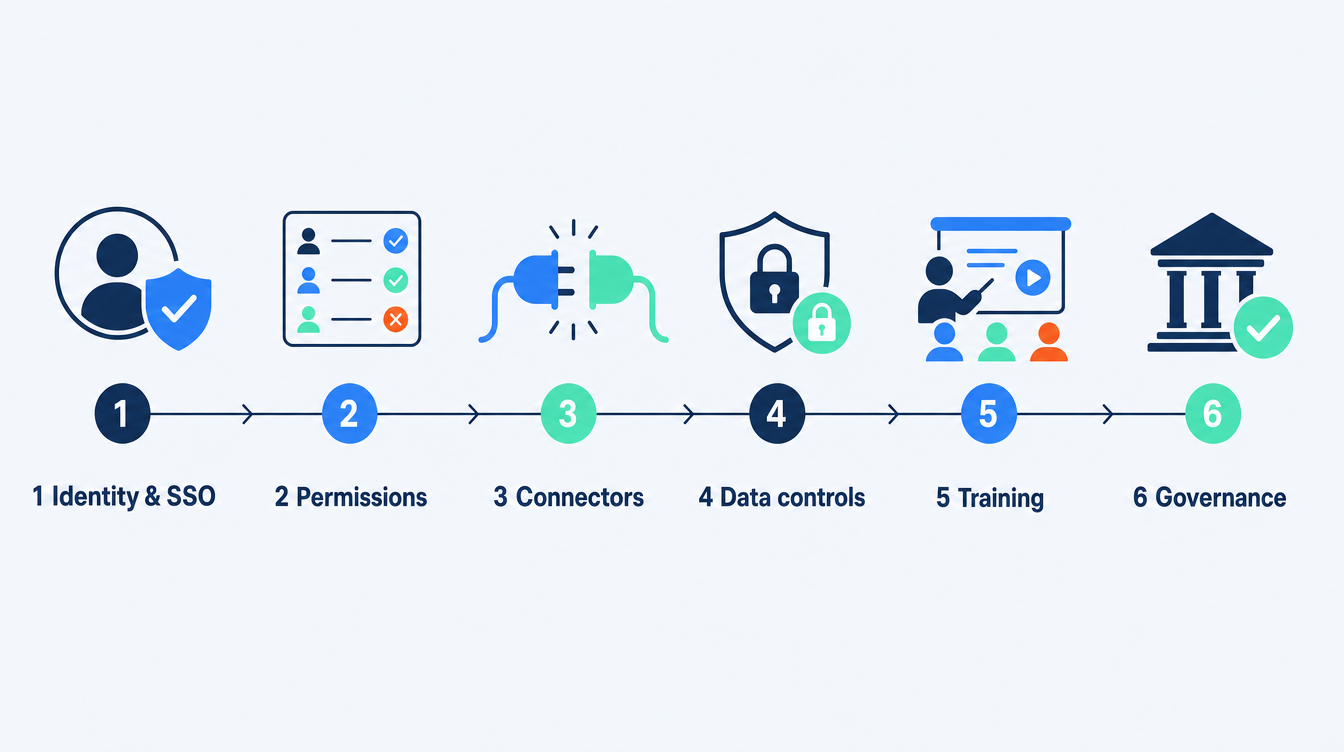
What to configure, phase by phase
| Phase | Configure | Owner |
|---|---|---|
| Foundation | SSO, domain capture, SCIM, roles and permissions | IT / Identity |
| Data | Connectors, data-retention rules, encryption, inference region | IT + Security |
| Compliance | Audit logs, Compliance API, spend limits, governance policy | Security + Finance |
| Adoption | Role-based training, pilot use cases, feedback loop | Team leads + owner |
Choosing those pilot use cases is a piece of work in its own right, and getting it wrong is the usual reason a rollout stalls after the foundation phase. If you are not yet sure which ones will pay back, a generative AI consulting assessment ranks the candidates and tests them against your own data before the rollout starts.
Build vs. buy: do you need an implementation partner?
Claude Enterprise is self-serve from 20 seats, so a smaller, less regulated team can absolutely stand it up alone. The case for a partner grows with three things: the number of connected systems, the sensitivity of your data, and how much the rollout depends on adoption rather than access.
A partner earns their fee by getting identity and permissions right the first time, scoping connectors so governance holds, building the training around your actual workflows, and running the narrow-then-scale pilot that keeps you out of the abandoned-project statistic. We use Claude across our own company: our Claude operating system case study is exactly this rollout run on ourselves, which is why we design the governance and adoption layers rather than just handing over logins.
Frequently asked questions
Do we need SSO and SCIM, or can we manage users manually?
You can manage a handful of users manually, but SSO and SCIM are what make a deployment safe at scale: centralised access, automatic offboarding, and no orphaned accounts. On a usage-billed plan, manual management also risks paying for seats nobody uses.
How does Claude Enterprise pricing work?
The per-seat fee covers platform access only. Usage across Claude, Claude Code and Cowork is billed separately at standard API rates, with no included token allowance, and admins can set spend limits at the organisation and user level. For a fuller breakdown, see our Claude Enterprise pricing guide.
Is our data safe with the connectors turned on?
Connectors respect the permissions in the source systems, and you choose which to enable. Combined with audit logs, custom retention, US-only inference and customer-managed encryption keys, you can meet a strict data posture, but only if you configure those controls rather than leaving defaults.
What is the minimum team size?
Twenty seats on the self-serve plan and fifty on a sales-assisted plan. HIPAA-readiness and a Business Associate Agreement are available on sales-assisted plans only.
How long does a Claude Enterprise rollout take?
The foundation (identity, permissions) is quick. The time goes into scoping connectors, writing governance and running a proper pilot with training. A focused mid-market rollout is a matter of weeks when it is planned in the order above.
What most often causes a rollout to fail?
The same things Gartner cites for abandoned GenAI projects: no clear business value, weak controls and poor adoption. A narrow pilot with real use cases and a governance policy addresses all three.
Softblues is Certified in the Claude Partner Network and a Google Cloud partner at Services Select tier, and we run our own company on Claude, so we implement it as practitioners rather than advise from the outside. You can see how we approach deployments on our business automation page.
For the deck version of the same ground, the Claude implementation guide, with the day-one governance switches covers what a firm actually deploys and the three cases where Claude is the wrong tool.
If you want a Claude Enterprise rollout scoped around your identity, data and governance rather than a generic setup, book a discovery call.
Work out your numbers
Your whole firm
AI ROI calculator
Five questions about your firm. See the time AI frees up, what it is worth and when it pays for itself.
Work out your numbersOne key process
Process automation ROI calculator
Five questions about one process. See the hours an AI agent frees up, what they are worth and how much becomes profit.
Work out your numbers
Free. No sign-up. Your answers stay in your browser.
See it in production
Systems we have built and run for clients, with the numbers that came out of them.
Related Articles
MCP server access: Claude, ChatGPT and Copilot in Microsoft 365
AI governance framework: a UK employee policy template