

Implementation guide · Free PDF · 21 slides
AI-native on Microsoft: Copilot and ChatGPT
Use this Softblues guide to decide whether adding ChatGPT to a Microsoft estate addresses a real constraint. Assign work to each platform and assess the combined cost against observed use.
From Softblues, a London-based AI consultancy. Platform details in the guide carry their own verification dates.
What is inside the guide?
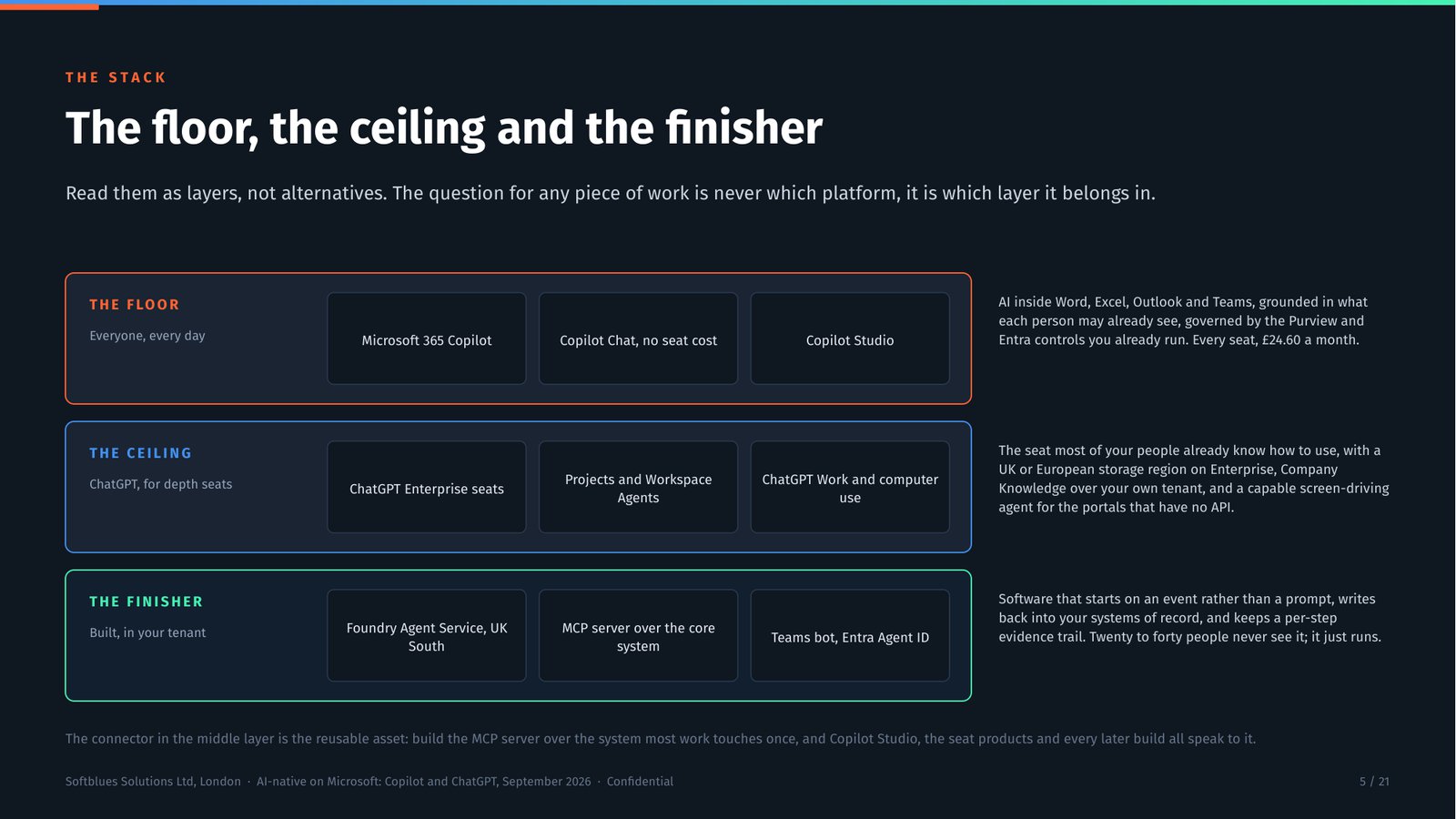
This is an addition to your Microsoft estate, not a migration away from it. The floor is inside Microsoft 365, the ceiling connects to it, and the finisher runs in your own Azure subscription.
Governance for the pair is one job rather than two: one DPIA and one transfer risk assessment covering both platforms, a minuted residency position per vendor, and the arrangement in the outsourcing register with an exit plan. Two or three days of work, once. Checked against vendor documentation 1 to 3 September and re-checked 1 and 8 October 2026.
The business case for the pair
The objective first, the workflow that has to change next, then the measurement that shows it did and what that is worth, across both layers. The deck closes on a baseline of one workflow rather than a call.
The three layers, drawn
What the floor covers for everyone, what the ceiling adds for the depth seats, and what the finisher does in your own Azure tenant.
Which ChatGPT plan clears the bar
The gaps that rule out Business for a regulated firm, and what the Enterprise control surface contains.
Which layer finishes which job
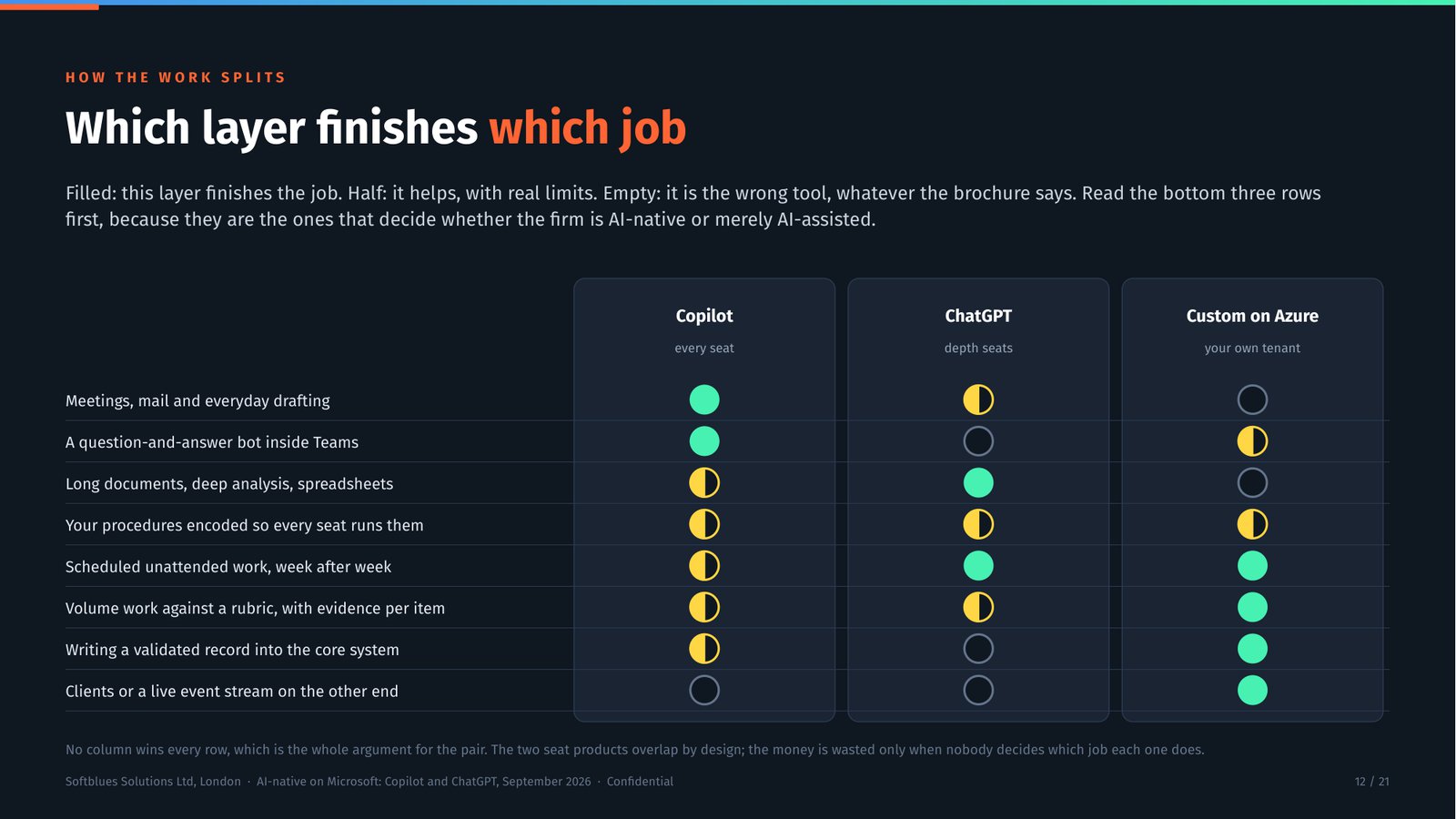
Eight kinds of work against the three layers, with the empty cells shown rather than hidden. No column wins every row.
Governance for the pair
The board paper list, what it costs in days, and where residency genuinely bites rather than where it is assumed to.
Get the deck
Twenty-one slides on running an AI-native firm on Copilot and ChatGPT together: the three layers, who gets which seat, the eleven worked examples, governance for the pair and what it costs. Free, with no obligatory follow-up. The 67-page research document behind it is what we bring to the conversation.
01 · WHAT IT MEANS
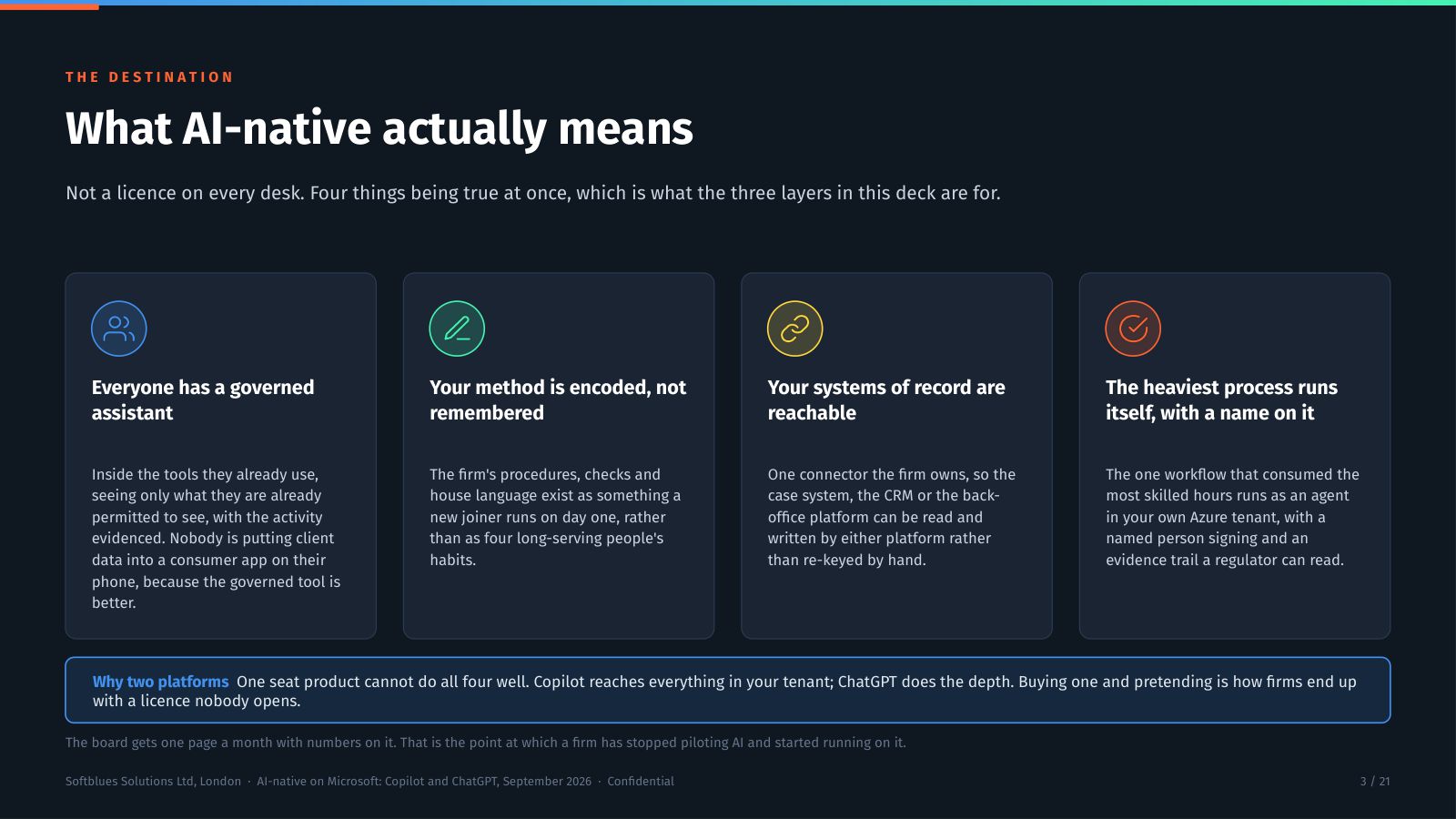
What does AI-native mean for a Microsoft firm?
Four things true at once. Everyone has a governed assistant inside the tools they already use. The firm's method is encoded rather than remembered. Your systems of record are reachable through one connector you own. And the heaviest process runs itself in your own Azure tenant, with a named person signing it off.
02 · THE ANSWER
How do the three layers fit together?
Copilot is the floor for every seat at £24.60 per user per month, native to Word, Outlook and Teams. ChatGPT Enterprise is the ceiling for the people whose work is depth, with the widest brand recognition of the three. Custom agents in your own Azure tenant finish the rest. As verified 1 to 3 September and re-checked 1 October 2026.
03 · THE WORK
Which layer finishes which job?
Eight kinds of work against the three layers, with the empty cells shown rather than hidden. No column wins every row, which is the whole argument for the pair. The two seat products overlap by design. The money is wasted only when nobody has decided which job each one does.
04 · THE HONEST PART
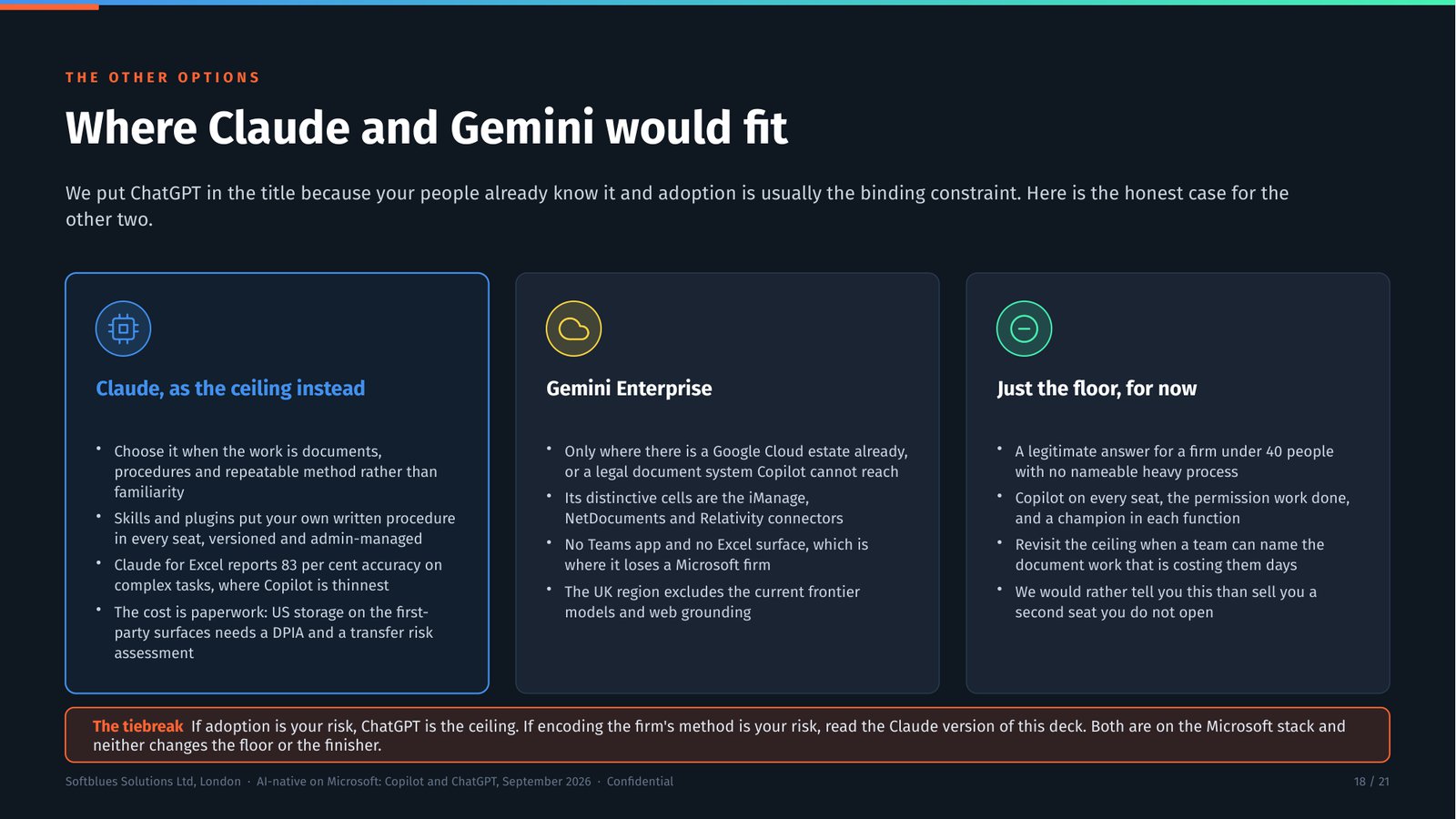
When would Claude be the better complement?
When the ceiling work is long documents, spreadsheet models, procedures the firm runs every week, or code, and when the firm wants its own methods encoded as something a new joiner runs on day one. Gemini changes the answer only for a firm with a Google Cloud estate. The deck names both rather than leaving them out.
How will you judge whether it is worth the investment?
Hours released are capacity, not automatically profit. Name how that capacity will be used, establish a baseline and include implementation, training and running costs. Benefits start when people adopt the workflow, while some costs start earlier.
Compare equivalent completed work, including human review and exceptions. Count shared costs once and keep cash savings separate from estimates of capacity or reduced risk.
Where can you take this next?
The case describes its own platform and project stage. Use it to understand the approach, then assess the fit for your team.
If you want to discuss that fit, book a discovery call about AI adoption.
Common questions
Do we have to leave Microsoft 365 to add ChatGPT?
No. This is an addition to the Microsoft estate rather than a migration away from it. Copilot stays as the floor inside Word, Outlook and Teams. ChatGPT Enterprise reaches the same tenant through the admin-managed synced connector behind Company Knowledge, and the finisher runs on Foundry Agent Service in your own Azure subscription. Everything stays where your identity and your files already are.
Which ChatGPT plan does a regulated firm need?
Enterprise. Business has no SCIM or directory provisioning, caps at 200 paid seats, lets any member invite another member, has no SharePoint synced connector, and is not named in OpenAI's data residency list. Enterprise is sales-led with undisclosed pricing, and what you are buying is the control surface: SSO with SCIM, role-based access, group permissions, IP allow-listing, spend limits, the Compliance Logs Platform and Enterprise Key Management. As verified 1 to 3 September and re-checked 1 October 2026.
Is it wasteful to give one person two paid AI seats?
Not when they do different jobs. A partner drafting a long document uses the ceiling; the same partner in a Teams meeting uses Copilot. It becomes waste when nobody has decided which surface each kind of work belongs on. The fix is one page in the AI policy saying so, plus a quarterly review of weekly active use per seat rather than licences bought.
What does the governance for two platforms actually involve?
One DPIA and one transfer risk assessment covering both platforms, a minuted residency position per vendor, the arrangement recorded in the outsourcing or ICT third-party register with an exit plan, and named sub-processors in the privacy notice. Two or three days of work, once. The ChatGPT UK region covers storage only, with processing elsewhere, so that distinction goes in the minute rather than being glossed over.
Why would we build anything if both seat products have agents?
Because both seat products wait to be asked. Their agents are chat-shaped and start when a human types. Real operational work starts when an email lands, a file is dropped, or the clock strikes 6am on the first of the month, and it has to write a validated record back into a system of record with evidence per step. That is a build, in your own Azure tenant, with a named human approving anything that has an external effect.
When would Claude be the better complement to Copilot?
When the ceiling work is long documents, spreadsheet models, procedures the firm runs every week, or code, and when the firm wants its own methods encoded as something a new joiner runs on day one. The deck has a slide naming this honestly rather than leaving it out, because the pairing that suits your firm is a question of the work and the people, not of which vendor we would rather sell.
Is the deck really free?
Yes. Complete the download form with your name, work email, company and role. The thank-you page provides the free 21-slide PDF. The longer companion document is not included in this download.