How to Turn Meeting Notes into CRM Updates and Actions with AI
Sales reps spend just 28% of their week actually selling (Salesforce). Here is the five-stage workflow that turns meeting notes into approved CRM updates and follow-up tasks.

By Ivan Pylypchuk (opens in a new tab), CEO of Softblues. Has led Claude and Gemini implementations for finance, legal and professional-services teams across the UK and Ireland.
AI can turn a recorded meeting into a drafted CRM update, follow-up tasks and a summary in minutes. The workflow has five stages: capture the transcript, extract decisions and actions, match them to the right CRM records, draft the update, and have a human approve it before anything is saved.
Here is the number behind the problem. Salesforce's own research found that sales reps spend just 28% of their week actually selling; the rest goes on admin, manual data entry and internal meetings (Salesforce, 2023). At Softblues, an AI consulting firm working with regulated mid-market companies across the UK and Ireland, we see the same pattern in client teams: the calls happen, the notes get scribbled, and the CRM quietly falls behind reality.
Key facts
- Sales reps spend just 28% of their week selling; admin and data entry eat much of the rest (Salesforce, 2023)
- An AI meeting-notes-to-CRM workflow drafts the update; a person approves it. Nothing writes to the CRM unattended
- Works with the CRMs UK mid-market teams already run: HubSpot, Salesforce, Pipedrive, Attio, Dynamics, via their APIs or MCP connectors
- A working version typically takes 2 to 4 weeks to stand up (our data, indicative, July 2026)
- UK GDPR applies to call recordings and transcripts: you need a lawful basis, told participants, and retention limits (see ICO guidance)
Who this is for, and who it isn't. This guide is for sales, account-management and client-facing teams at UK and Ireland firms of roughly 50 to 500 people who run a CRM and lose hours each week re-typing what was said on calls. If your team does two client calls a month, or you have no CRM to update, skip it: the manual route is fine at that volume.
Why do CRM updates still not happen?
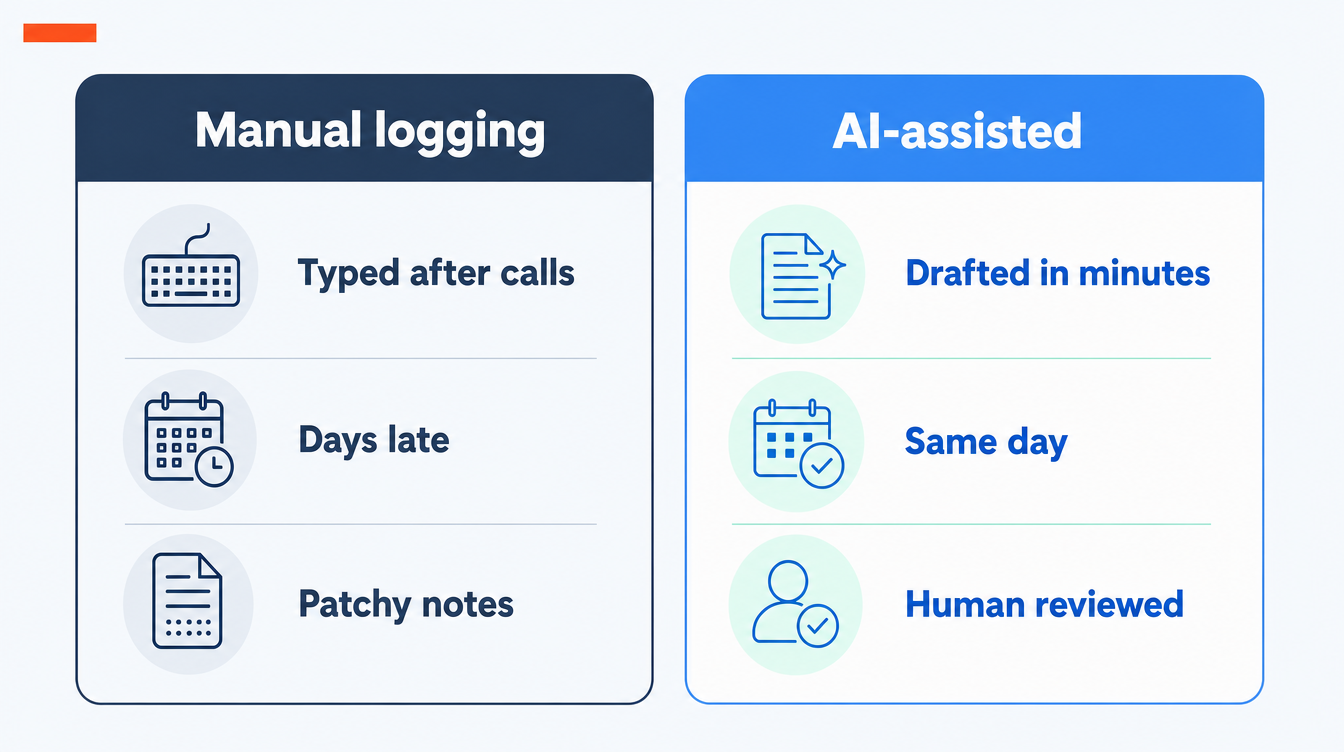
Because logging a call is the least rewarding task in a salesperson's week, and it always loses to the next call. The rep knows what was said. Typing it into the CRM helps everyone except the rep, so it gets done late, briefly, or never.
The cost shows up later. Pipeline reviews run on stale stages. Handovers lose context. Forecasts are built on records that say "sent proposal" when the client actually asked for two changes and a new price. Salesforce's research above puts the selling share of a rep's week below a third; our own experience running Softblues on Claude internally is that call logging was one of the first admin tasks worth automating, exactly because nobody was doing it well by hand.
What does an AI meeting-notes-to-CRM workflow actually do?
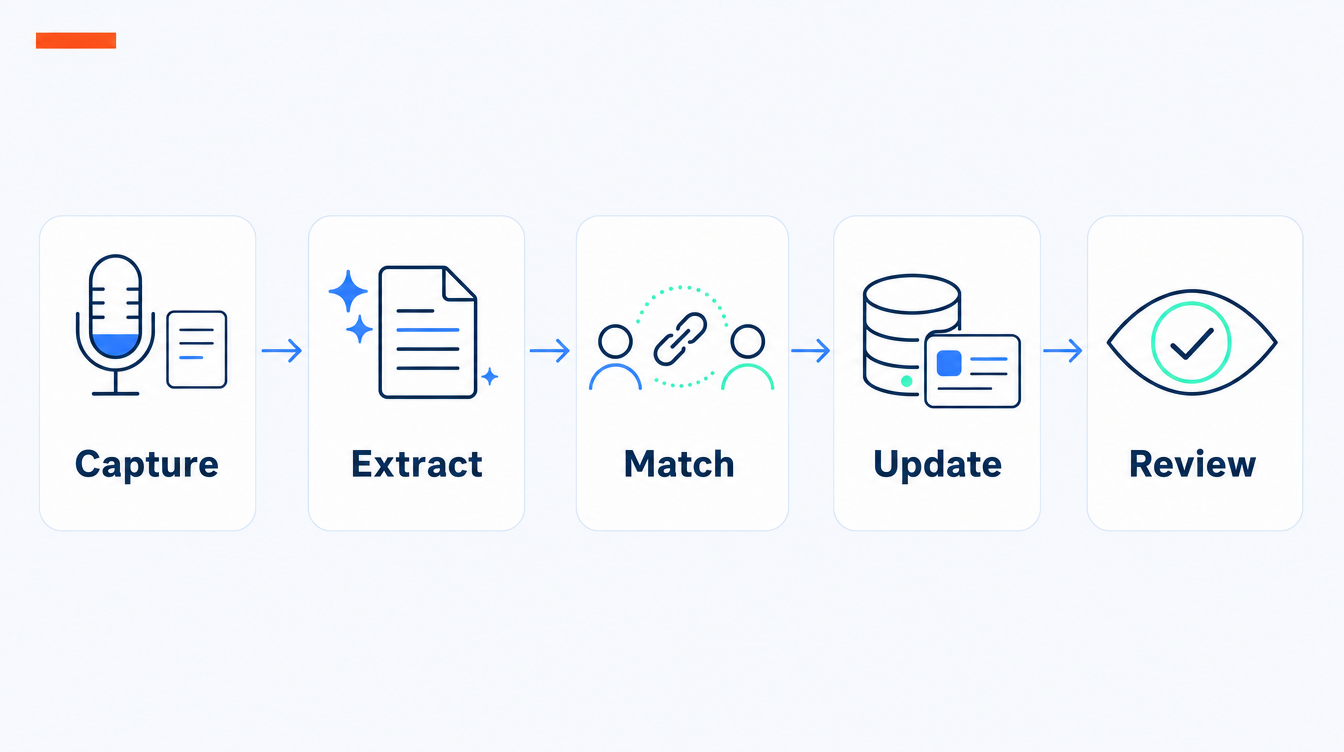
Five stages, and the order matters.
1. Capture. The raw material is a transcript. Most teams already have one: Teams, Meet and Zoom all transcribe natively, and notetakers such as Fathom or tl;dv do it as a bolt-on. If the meeting was in person, a phone recording or typed notes work too; the workflow does not care where the text came from.
2. Extract. A language model reads the transcript and pulls out the things a CRM cares about: what was decided, what the client committed to, what you committed to, dates, budget signals, objections, and who else was mentioned. This is the step generic meeting summarisers stop at. A summary is not a CRM update.
3. Match. The extracted items get matched to your actual CRM records: the right company, the right deal, the right contact. This is where most naive setups fail, because "Sarah from finance" has to become a specific contact record, not a new duplicate.
4. Update. The workflow drafts the changes: a call note on the deal, a stage suggestion if the conversation warrants one, new tasks with owners and dates, and any field updates (budget, timeline, next step).
5. Review. A person sees the draft and approves, edits or rejects it. In our builds nothing writes to the CRM without this step. The rep's job shrinks from ten minutes of typing to thirty seconds of checking.
Should you use native CRM AI, a point tool, or a custom workflow?
There are three honest routes, and the right one depends on how standard your process is.
| Route | What it is | Best for | Avoid if |
|---|---|---|---|
| Native CRM AI | The AI features inside HubSpot, Salesforce, Dynamics | Teams fully on one CRM with a plain sales process | Your process spans tools, or the native feature does not cover your CRM edition |
| Point tool | A notetaker with a CRM sync (Fathom, tl;dv, Gong and similar) | Fast start, per-seat pricing, standard fields only | You need custom fields, approval steps, or non-call inputs like emails and WhatsApp notes |
| Custom workflow | An agent built on a model such as Claude, connected to your CRM's API | Teams with their own fields, stages, routing rules and a review step | You have under ~20 client calls a month; the build will not pay back |
The point tools are genuinely good at the capture-and-summarise end. Where they run out of road is the match-and-update end: your deal stages, your qualification fields, your rule that a task always goes to the account owner unless the deal is in legal review. That logic is yours, and a custom workflow is where it lives. We cover the broader pattern in enterprise AI agent use cases that actually ship.
How do you set it up? A 4-week walkthrough
This is the shape of a typical build from our own UK engagements (indicative, July 2026). Yours may be shorter if your CRM hygiene is good.
| Week | What happens |
|---|---|
| 1 | Map the target: which fields, which note format, which tasks. Write the extraction spec from 5 real past transcripts |
| 2 | Build extract and match against a copy of your CRM data. Tune entity matching on your real account names |
| 3 | Add the review step (Slack, Teams or in-CRM approval) and pilot with 2 or 3 reps on live calls |
| 4 | Widen to the team, measure edit rates, tighten the prompts where reps keep correcting the same thing |
The single best predictor of success is week 1. If you cannot write down what a good CRM update looks like for your team, the model cannot draft one. Start with the five most recent deals and reverse-engineer what should have been logged.
What about recording consent and UK GDPR?
Transcripts of client calls are personal data. Before switching anything on, agree three things with whoever owns data protection: a lawful basis for recording and processing (legitimate interests is common, but document the assessment), a notice so participants know calls are recorded and transcribed, and a retention rule so transcripts do not pile up forever. The ICO's UK GDPR guidance is the reference. Also check where the transcription and model processing happens; enterprise plans from the main model vendors offer no-training commitments and regional controls, and your compliance team will want those in writing.
Where does this go wrong?
Four failure modes come up repeatedly. Ambiguous transcripts: two companies with similar names on one call will confuse the matcher, so give it a confidence threshold and a "not sure, ask" path. Over-writing: a workflow that updates every field every time will overwrite careful human notes; restrict it to appending notes and suggesting field changes. Stage inflation: models are optimists and will nudge deals forward on polite noises; keep stage changes as suggestions only. And silence: if reps never see value back (a pre-call brief, a drafted follow-up email), they stop feeding the system. Pair the CRM update with something the rep gets in return.
If you want to place this in a wider automation plan, our guide to what mid-market companies should automate first puts meeting-notes-to-CRM alongside the other back-office candidates.
Frequently asked questions
Does this work with our CRM?
Almost certainly. HubSpot, Salesforce, Pipedrive, Dynamics and Attio all have usable APIs, and several now have MCP connectors that let a Claude-based agent read and write records directly. The harder question is your field structure, not the CRM brand.
Do we need to record every call?
No. Start with external client calls where the CRM value is highest, and keep internal meetings out of scope. Typed notes and voice memos can feed the same workflow for in-person meetings.
Will it update the CRM without a human?
Not in our builds. The workflow drafts; a person approves. You can loosen this later for low-risk actions such as appending a call note, but stage changes and field edits should stay behind approval.
How accurate is the extraction?
Good on decisions, actions and dates when the transcript is clear; weaker on inferring intent from vague conversation. The review step exists because no model gets 100%. Measure the edit rate in the pilot; if reps rewrite more than they approve, the extraction spec needs work.
What does it cost?
Native CRM AI is bundled or per-seat; point tools are typically per-user per month; a custom workflow is a fixed project (ours are priced in the proposal after a paid discovery). Which route pays back depends on call volume; do the sums on hours saved per rep per week.
How is this different from a meeting notetaker we already have?
A notetaker gives you a summary in its own app. This workflow puts structured, approved updates in your CRM: the notes, tasks, and field changes, matched to the right records. Keep the notetaker; it becomes the capture layer.
Softblues is an OpenAI Select Partner, Certified in the Claude Partner Network, a Google Cloud partner at Services Select tier, and a member of the Microsoft AI Cloud Partner Program. We run our own sales operation this way, on Claude, before selling it to anyone else. If your team's CRM is always a week behind its calls, we can map the workflow to your stack in one call: book a discovery call, or see how we approach business process automation.
Work out your numbers
One key process
Process automation ROI calculator
Five questions about one process. See the hours an AI agent frees up, what they are worth and how much becomes profit.
Work out your numbersYour whole firm
AI ROI calculator
Five questions about your firm. See the time AI frees up, what it is worth and when it pays for itself.
Work out your numbers
Free. No sign-up. Your answers stay in your browser.
See it in production
Systems we have built and run for clients, with the numbers that came out of them.
Related Articles
Claude in Excel for the month-end pack: what AI prepares and finance signs

AI meeting notes: the client file workflow for UK firms