
Claude in Excel for the month-end pack: what AI prepares and finance signs
Prepare a month-end pack with traceable figures and checked commentary. Compare Copilot, Claude and ChatGPT in Excel, with the finance lead still signing off.

By Ivan Pylypchuk (opens in a new tab), CEO of Softblues. Checked 13 October 2026.
A month-end pack needs figures that recalculate and explanations someone can check. Claude in Excel, Copilot in Excel and ChatGPT for Excel can help prepare the workbook and draft commentary. Your finance lead still approves the numbers, resolves unexplained movements and releases the pack.
For a UK or Irish firm already using Microsoft 365, start by testing the Excel tools your organisation has approved. Add another assistant when it handles a particular workbook better. Softblues uses this as agent 6, Monthly management and board pack, in the connected P2 tier of our AI adoption guide.
Key facts
- Microsoft: the preview COPILOT worksheet function ended on 14 September 2026; cached results can remain until recalculation returns #NAME?. Checked 13 October 2026. Source.
- Microsoft: current guidance describes edit, chat and plan modes on Windows, Mac and the web. Checked 13 October 2026. Source.
- Claude: the Excel add-in can update assumptions and build models with spreadsheet formulas; the Microsoft 365 page lists Excel as generally available on paid plans. Checked 13 October 2026. Source.
- ChatGPT: the Excel sidebar can build, update and explain multi-tab workbooks; OpenAI warns that VBA and macros may not be fully supported. Checked 13 October 2026. Source.
- Softblues: the calculator's accounting example shows 113 hours freed per week from a wider bank-reconciliation and month-end process. This is an illustrative assumption, not a measured client result or an Excel add-in benchmark. Checked 13 October 2026.
Size the work before choosing an add-in
Measure a complete cycle, including checking and correction. We have no verified saving for your firm. The month-end close article covers the wider process.
The recurring job starts before anyone writes commentary. Someone obtains the ledger export, checks the reporting period, updates the budget comparison and follows up unexplained balances. Then the finance lead reviews the narrative and files the approved pack.
Use the process automation ROI calculator to test those inputs. Its accounting preset covers bank reconciliations and month-end across eight people, with 225 hours of work a week and an assumed agent share of about half. The displayed 113 hours freed are capacity, not profit. That scope is much wider than drafting a monthly pack, so do not transfer its result to one Excel sidebar.
A procedure from source files to signed pack
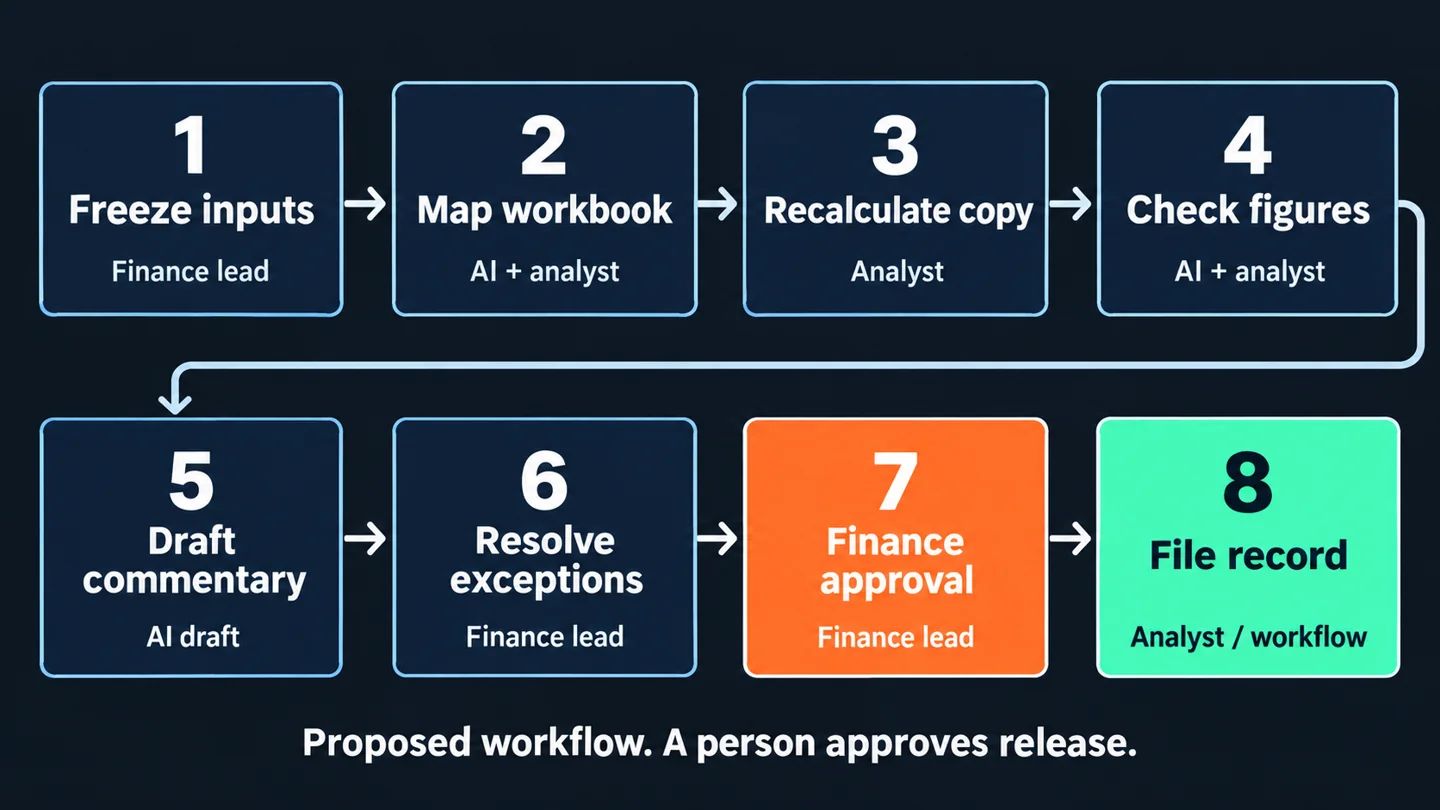
Keep the calculations in normal spreadsheet formulas or tested code. Ask the assistant to work from those results and cite the cells it uses. The following procedure is a proposed working practice, not a claim that any vendor automatically enforces it.
1. Finance lead: freeze the inputs. Save the dated exports, approved budget and prior pack in a restricted folder. Record the entity, currency, period and version. Agree who can change the files during preparation.
2. AI drafts; analyst checks: map the workbook. Ask it to identify input tabs, calculation tabs, hidden sheets and links to other files. Compare that map with the workbook before allowing edits. Missing source data becomes an exception, not a guessed value.
3. Analyst: preserve a baseline and recalculate. Work on a copy and compare its totals with the approved source. Search for retired COPILOT functions and broken references. A visible cached answer does not prove that the workbook will calculate correctly next month.
4. AI assists; analyst verifies: prepare the figures table. Use formulas to calculate actual, budget, prior period and variance. Keep units and sign conventions explicit. Each reported figure needs a file, sheet and cell reference. Tie the totals back to the source export.
5. AI drafts: write commentary from approved figures. Set the threshold for a movement needing explanation. Ask for the amount, the source and the supported cause. If the workbook shows a movement but no cause, the commentary must say that the cause is unconfirmed.
6. Finance lead: resolve exceptions. Check material movements with the responsible manager. An overdue invoice can explain a timing difference only when the underlying record supports it. Add that evidence and revise the draft.
7. Finance lead: approve the pack. Review changed formulas, source references, charts and narrative together. Record the reviewer, version and decision. This is the release point; the assistant does not approve its own work.
8. Analyst or approved workflow: file the record. Save the signed pack with its source versions, figures table and unresolved items. Carry corrections into the next month's instructions, while keeping the historical pack intact.
Which platform should a Microsoft-first finance team try?
Start with the governed tool already available to the finance team, using a sanitised copy of a completed pack. Compare alternatives on the same material only if the first tool leaves a meaningful gap. The table describes assistance with the job, not autonomous accounting or a product ranking.
| Decision | Copilot in Excel | Claude for Excel | ChatGPT for Excel |
|---|---|---|---|
| Work in this pack | Edit sheets, formulas, charts and PivotTables; plan changes before applying them [1] | Explain cells, revise assumptions and build formula-based models [2] | Build, update and explain multi-tab files [3] |
| What must be enabled | Eligible access and your organisation's Copilot settings [1] | Approved add-in and the chosen Claude account or cloud route [2] | Approved add-in and workspace access; admins can enable the feature [3] |
| Where the working record sits | The Excel workbook; file the approved version in your controlled library [1] | Changes in Excel; our procedure retains the approved workbook and evidence [2] | Changes in the workbook; spreadsheet chat does not sync to main ChatGPT history [3] |
| Honest limit | A supported Excel feature does not validate your finance definitions | Formula support is a capability, not a guarantee that every edit is right | Macro-heavy work needs particular testing; advanced features may be unsupported [3] |
Sources, checked 13 October 2026: 1 Microsoft, 2 Anthropic, 3 OpenAI. Filing and approval instructions are our recommendations.
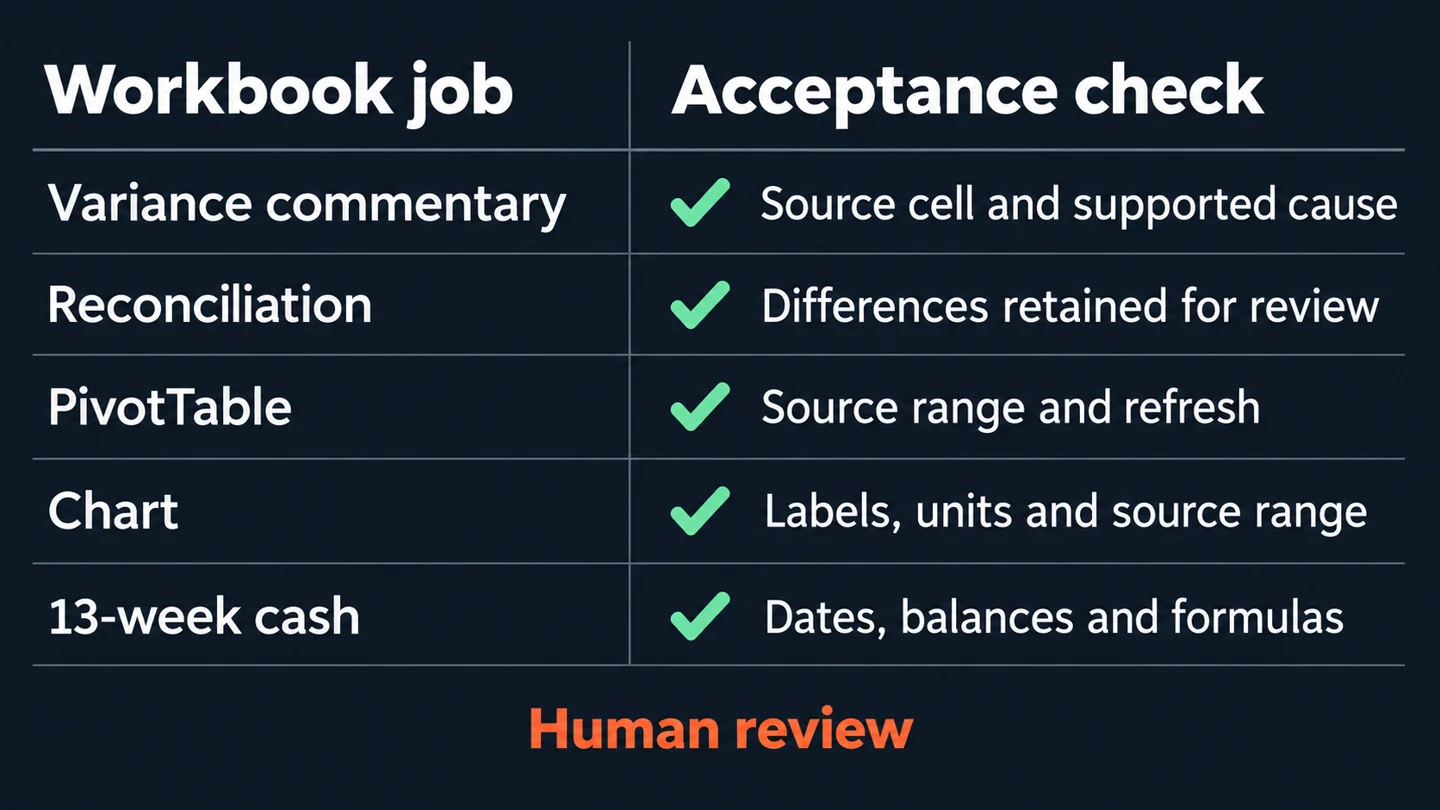
For variance commentary, judge whether the explanation cites the right cells and leaves unknown causes open. For reconciliation, judge whether differences are surfaced for review. For a PivotTable or chart, inspect the source range and refresh behaviour. For a 13-week cash model, check dates, opening balances and formulas after changing an assumption. Those tests are more informative than how polished the first answer looks.
What needs governance and human review?
An add-in's position inside Excel does not establish where its AI processing happens. Have IT document the approved account, provider route, permissions and retention terms for the actual configuration. Restrict payroll and client information to what the task needs. Keep access to source files and the signed board pack under the firm's existing controls.
For an FCA-regulated firm, the regulator's AI approach, checked 13 October, relies on existing frameworks and emphasises senior-management accountability. It does not certify a particular workbook or add-in. Our practical interpretation is to make the pack owner, review evidence and release decision explicit.
Where personal data is involved, the ICO's accuracy guidance, checked 13 October, distinguishes factual accuracy from an AI system's statistical accuracy. Label inference as inference. The ICO says this guidance is under review following the Data (Use and Access) Act, so check the applicable requirements with the firm's data-protection lead. These UK references do not substitute for an Irish firm's own regulatory assessment.
What to do this week, cheapest first
With no new software spend, take last month's pack and trace each headline number to its source. Ask the preparer: "Could a deputy reproduce this figure from the saved files?" A usable answer names the version and calculation, not just the person who knows it.
Next, test an approved assistant you already have. Request one figures table and commentary on one material movement. Accept the work only after checking both. Record preparation, checking and correction time so the comparison includes the full cost of review.
Trial another add-in if the existing tool struggles with the workbook. Check access and usage terms first. OpenAI's current guidance says business spreadsheet usage follows the plan's credits and usage terms after its preview ended on 2 June 2026; an Excel licence alone does not establish AI usage entitlement.
Consider a connected workflow when repeated exports or inconsistent inputs dominate the effort. Agent 6 remains P2 in our guide; an interactive workbook trial is one component of that pattern. A custom integration needs a scoped business case and a named owner, not merely an impressive draft.
Put the pack in the wider adoption plan
Softblues helps UK and Irish firms choose and govern assistants, then connect the workflows that justify further work. Our anonymised financial-advice compliance file-review example describes a discovery and proposed review workflow, not a deployed system or measured month-end saving.
Get the deck and guide, Four ways to make a regulated firm AI-native, and read agent 6 in the worked examples. Use the calculator above to size your process, then book a discovery call with the preparer and the person who signs the pack. Timelines and prices come from the proposal after a paid discovery.
Frequently asked questions
Can Claude in Excel prepare management accounts?
It can assist with the workbook and commentary. The finance lead still verifies source data, accounting treatment and output before approval. Test a copy of a completed pack before using it in the next close.
Is Copilot in Excel the same as the COPILOT function?
No. Microsoft retired the preview worksheet function on 14 September 2026 while continuing the Copilot pane. Check inherited files because recalculating a cell with the retired function returns #NAME?.
Can ChatGPT in Excel replace a macro-based month-end process?
Do not assume so. OpenAI says advanced features such as VBA and macros may not be fully supported. Test the specific workbook and retain the existing process until the results are accepted.
What should AI management accounts commentary contain?
Include the calculated movement, source reference and supported explanation. Keep an unconfirmed cause clearly marked for the responsible manager. The variance-commentary article explains that review pattern in more detail.
Dated sources
All platform and regulator pages linked above were checked on 13 October 2026. The workflow derives from agent 6 in the Softblues AI adoption guide and platform playbooks, with the Excel capability reconciliation dated 13 October. Calculator figures are illustrative starting assumptions at typical prices, not client results.
Work out your numbers
One key process
Process automation ROI calculator
Five questions about one process. See the hours an AI agent frees up, what they are worth and how much becomes profit.
Work out your numbersYour whole firm
AI ROI calculator
Five questions about your firm. See the time AI frees up, what it is worth and when it pays for itself.
Work out your numbers
Free. No sign-up. Your answers stay in your browser.
See it in production
Systems we have built and run for clients, with the numbers that came out of them.
Related Articles

AI meeting notes: the client file workflow for UK firms

AI Automation Pricing UK 2026: What Providers Actually Charge